

All patterns

Product Image Zoom

The product magnifies inside its own frame with the transform origin chasing the pointer.

commercepremiumelegantinteraction · finite · advanced · ~0.4s
Interactive · click to play
Variant

The animated component in this preview is rendered from the canonical file shown here. The surrounding demo shell only provides context and is not part of the copied code.

291 lines · react + motion only
import { useState } from "react";
import type { PointerEvent as ReactPointerEvent } from "react";
import {
  motion,
  useMotionTemplate,
  useMotionValue,
  useSpring,
  useReducedMotion,
} from "motion/react";

/**
 * Vibary · Product Image Zoom
 *
 * The product magnifies inside its own frame and the magnification
 * follows the pointer: the transform origin chases the cursor on a
 * spring, so the detail under your finger is the detail that grows.
 *
 * Self-contained: depends only on `motion` (react ships with your app).
 * The frame chrome is mixed from the inherited text color; the product
 * stand-in is a literal gradient because it takes the place of a photo.
 * Works with zero props; tune via `variant`, `imageSrc`, `zoom`.
 * Requires the automatic JSX runtime (default since React 17).
 */

export type ProductImageZoomProps = {
  /** Visual character of the motion. */
  variant?: "subtle" | "default" | "playful";
  /** Real photo. Omitted, the frame draws its own stand-in. */
  imageSrc?: string;
  /** Alternative text for the photo. */
  alt?: string;
  /** Product title under the frame. */
  productName?: string;
  /** Formatted price. */
  price?: string;
  /** Hint shown until the pointer arrives. */
  hint?: string;
  /** How far in the magnification goes. */
  zoom?: number;
  /** Fires whenever the frame enters or leaves its magnified state. */
  onZoomChange?: (zoomed: boolean) => void;
};

type VariantConfig = {
  /** Spring the magnification itself rides. */
  grow: { type: "spring"; stiffness: number; damping: number };
  /** Spring the origin uses to chase the pointer. */
  track: { stiffness: number; damping: number };
  /** Default magnification for this variant. */
  zoom: number;
};

// The frame is being inspected, so it has to hold perfectly still under
// the cursor: damping ratios (damping / 2√stiffness) sit at or above
// 0.94 and nothing overshoots. Variants differ in how far in the
// magnification goes and how tightly the origin tracks.
const VARIANTS: Record<"subtle" | "default" | "playful", VariantConfig> = {
  // A gentle lift with a lazily tracking origin. For a browse grid.
  subtle: {
    grow: { type: "spring", stiffness: 320, damping: 36 },
    track: { stiffness: 160, damping: 26 },
    zoom: 1.5,
  },
  // Enough magnification to read stitching, origin close under the
  // pointer. All-purpose.
  default: {
    grow: { type: "spring", stiffness: 260, damping: 32 },
    track: { stiffness: 300, damping: 34 },
    zoom: 2.1,
  },
  // A loupe: deep magnification with the origin locked to the pointer.
  playful: {
    grow: { type: "spring", stiffness: 210, damping: 29 },
    track: { stiffness: 520, damping: 46 },
    zoom: 2.9,
  },
};

/** Theme-adaptive neutral for the chrome. The product stand-in stays
 *  literal — it takes the place of a photograph, not of a surface. */
const tone = (percent: number) =>
  `color-mix(in srgb, currentColor ${percent}%, transparent)`;

/** Stand-in for the product shot: a gradient studio backdrop with a
 *  drawn object on it, so the file stays one copyable unit. */
function ProductArt() {
  return (
    <div
      aria-hidden
      style={{
        width: "100%",
        height: "100%",
        display: "grid",
        placeItems: "center",
        background:
          "radial-gradient(120% 100% at 32% 22%, #F3F0E8 0%, #DCD5C6 52%, #B9AE99 100%)",
      }}
    >
      <svg viewBox="0 0 120 120" width="66%" height="66%" fill="none">
        <path
          d="M28 46h64l-5 52a8 8 0 0 1-8 7.2H41a8 8 0 0 1-8-7.2L28 46Z"
          fill="#5D5442"
          fillOpacity="0.14"
        />
        <path
          d="M28 46h64l-5 52a8 8 0 0 1-8 7.2H41a8 8 0 0 1-8-7.2L28 46Z"
          stroke="#4C4636"
          strokeOpacity="0.55"
          strokeWidth="2.4"
          strokeLinejoin="round"
        />
        <path
          d="M45 54V33a15 15 0 0 1 30 0v21"
          stroke="#4C4636"
          strokeOpacity="0.55"
          strokeWidth="2.4"
          strokeLinecap="round"
        />
        <path
          d="M40 66h40M40 78h26"
          stroke="#4C4636"
          strokeOpacity="0.22"
          strokeWidth="2"
          strokeLinecap="round"
        />
      </svg>
    </div>
  );
}

export default function ProductImageZoom({
  variant = "default",
  imageSrc,
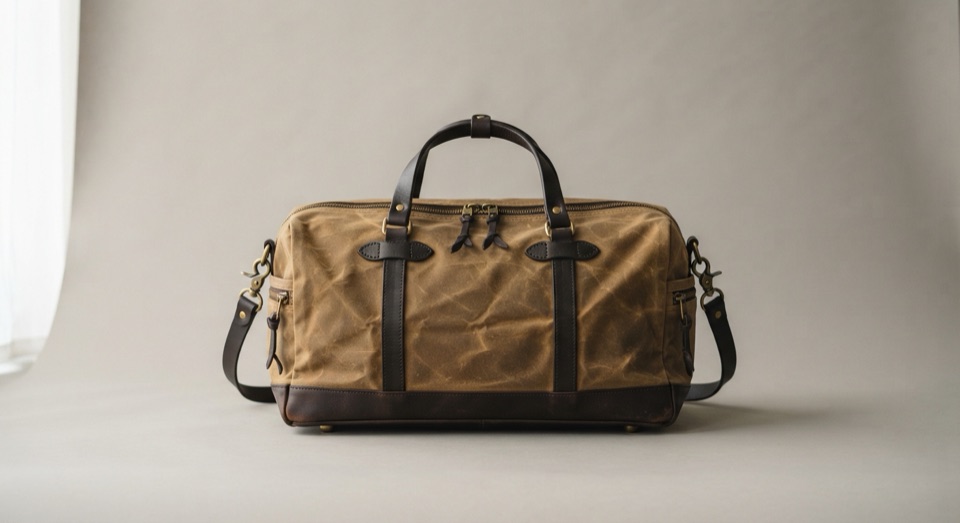
  alt = "Waxed cotton holdall, olive",
  productName = "Waxed cotton holdall",
  price = "$212.00",
  hint = "Point at the fabric to magnify",
  zoom,
  onZoomChange,
}: ProductImageZoomProps) {
  const reduceMotion = useReducedMotion();
  const cfg = VARIANTS[variant];
  const magnification = zoom ?? cfg.zoom;

  const [zoomed, setZoomed] = useState(false);

  // The origin is expressed as a pair of percentages so it stays correct
  // whatever the frame measures in the host layout.
  const pointerX = useMotionValue(50);
  const pointerY = useMotionValue(50);
  const smoothX = useSpring(pointerX, cfg.track);
  const smoothY = useSpring(pointerY, cfg.track);
  const smoothOrigin = useMotionTemplate`${smoothX}% ${smoothY}%`;
  const exactOrigin = useMotionTemplate`${pointerX}% ${pointerY}%`;
  // Reduced motion keeps the magnification — it is the information — and
  // drops the chase and the growth, applying both at once instead.
  const origin = reduceMotion ? exactOrigin : smoothOrigin;

  const setZoom = (next: boolean) => {
    setZoomed(next);
    onZoomChange?.(next);
  };

  const track = (event: ReactPointerEvent<HTMLDivElement>) => {
    const rect = event.currentTarget.getBoundingClientRect();
    if (!rect.width || !rect.height) return;
    pointerX.set(((event.clientX - rect.left) / rect.width) * 100);
    pointerY.set(((event.clientY - rect.top) / rect.height) * 100);
  };

  return (
    <div style={{ width: 244, display: "grid", gap: 12, fontSize: 13 }}>
      <div
        role="img"
        aria-label={alt}
        onPointerEnter={(event) => {
          track(event);
          setZoom(true);
        }}
        onPointerMove={track}
        onPointerLeave={() => setZoom(false)}
        onPointerDown={(event) => {
          // Coarse pointers get press-and-hold instead of a hover. A
          // mouse is left alone here: releasing a click over the frame
          // must not cancel the hover the pointer is still inside.
          if (event.pointerType === "mouse") return;
          track(event);
          setZoom(true);
        }}
        onPointerUp={(event) => {
          if (event.pointerType === "mouse") return;
          setZoom(false);
        }}
        style={{
          position: "relative",
          width: "100%",
          aspectRatio: "1 / 1",
          borderRadius: 16,
          overflow: "hidden",
          border: `1px solid ${tone(12)}`,
          background: tone(6),
          cursor: "zoom-in",
          touchAction: "none",
        }}
      >
        <motion.div
          initial={false}
          animate={{ scale: zoomed ? magnification : 1 }}
          transition={reduceMotion ? { duration: 0 } : cfg.grow}
          style={{
            position: "absolute",
            inset: 0,
            transformOrigin: origin,
          }}
        >
          {imageSrc ? (
            <img
              src={imageSrc}
              alt=""
              style={{
                width: "100%",
                height: "100%",
                objectFit: "cover",
                display: "block",
              }}
            />
          ) : (
            <ProductArt />
          )}
        </motion.div>

        {/* The hint steps aside as soon as the frame is being used. It
            fades and shifts a few pixels; the sentence keeps one size. */}
        <motion.span
          initial={false}
          animate={{ opacity: zoomed ? 0 : 1, y: zoomed && !reduceMotion ? 5 : 0 }}
          transition={{ duration: 0.2, ease: "easeOut" }}
          style={{
            position: "absolute",
            left: 10,
            bottom: 10,
            display: "inline-flex",
            alignItems: "center",
            gap: 6,
            padding: "5px 9px",
            borderRadius: 999,
            fontSize: 11,
            fontWeight: 600,
            // Sits over artwork, so it needs an opaque plate: `Canvas`
            // and `CanvasText` are the page's own background and text
            // colors, correct in a light app and in a dark one.
            background: "Canvas",
            color: "CanvasText",
            border: `1px solid ${tone(12)}`,
            pointerEvents: "none",
          }}
        >
          <svg width="11" height="11" viewBox="0 0 14 14" fill="none" aria-hidden>
            <circle
              cx="6.2"
              cy="6.2"
              r="4.4"
              stroke="currentColor"
              strokeWidth="1.5"
            />
            <path
              d="M9.5 9.5 12.4 12.4M4.4 6.2h3.6M6.2 4.4v3.6"
              stroke="currentColor"
              strokeWidth="1.5"
              strokeLinecap="round"
            />
          </svg>
          {hint}
        </motion.span>
      </div>

      <div style={{ display: "flex", alignItems: "baseline", gap: 10 }}>
        <span style={{ fontSize: 13, fontWeight: 600 }}>{productName}</span>
        <span
          style={{
            marginLeft: "auto",
            fontSize: 12.5,
            fontVariantNumeric: "tabular-nums",
          }}
        >
          {price}
        </span>
      </div>
    </div>
  );
}

About this pattern

Magnification is only useful if it magnifies the right thing. The frame grows the product on a spring while the transform origin follows the pointer on a second, tighter spring, so the detail under the cursor is the detail that opens up and the frame never has to be re-aimed. Origin is expressed in percentages, which keeps it correct at any frame size, and the whole thing is one transform — no layout work per frame. Reduced motion keeps the magnification, because that is the information, and drops the chase.

Product detail imageryFabric and finish inspectionZoomable gallery framePrint or artwork preview

Where it shows up

Screens we drew to show where this motion usually sits. Illustrations, not captures of any product.

  • NewMenWomenSale
    Men's trail shoeRidgeline GT$132Bone
    88.599.510
    Add to bag
    Free delivery and returns
    Product details
    Product page

    Pointing at a garment photo magnifies it inside the same frame rather than opening a modal.
Related patterns