

Variant Swatch Switch
Choosing a colorway crossfades the product while one selection ring travels to the swatch.
The animated component in this preview is rendered from the canonical file shown here. The surrounding demo shell only provides context and is not part of the copied code.
import { useId, useState } from "react";
import { AnimatePresence, motion, useReducedMotion } from "motion/react";
/**
* Vibary · Variant Swatch Switch
*
* Picking a colorway crossfades the product to its new finish while the
* selection ring travels to the swatch you chose — one ring that moves,
* not two rings taking turns.
*
* Self-contained: depends only on `motion` (react ships with your app).
* Chrome is mixed from the inherited text color; the colorways are
* literal because they stand in for the product's actual finishes.
* Works with zero props; tune via `variant`, `colorways`, `imageSrc`.
* Requires the automatic JSX runtime (default since React 17).
*/
export type Colorway = {
id: string;
/** Name shown under the frame. */
name: string;
/** Swatch dot color. */
swatch: string;
/** Backdrop of the product stand-in for this finish. */
backdrop: string;
/** Line color of the drawn object for this finish. */
ink: string;
/** Optional real photo for this finish. */
imageSrc?: string;
};
export type VariantSwatchSwitchProps = {
/** Visual character of the motion. */
variant?: "subtle" | "default" | "playful";
/** The finishes on offer. */
colorways?: Colorway[];
/** Product title. */
productName?: string;
/** Formatted price. */
price?: string;
/** Accent for the travelling ring. */
accent?: string;
/** Fires with the chosen finish. */
onSelect?: (colorway: Colorway) => void;
};
type VariantConfig = {
/** Spring the ring rides between swatches. */
ring: { type: "spring"; stiffness: number; damping: number };
/** Crossfade length between two finishes. */
fadeSeconds: number;
/** How far the incoming finish slides in from, in px. */
slide: number;
};
// The ring is a pointer at the thing you just chose, so it arrives and
// stops: damping ratios (damping / 2√stiffness) sit at or above 0.86.
// Variants differ in how far the finishes slide, never in bounce.
const VARIANTS: Record<"subtle" | "default" | "playful", VariantConfig> = {
// A straight crossfade with a fast ring. For a dense listing grid.
subtle: {
ring: { type: "spring", stiffness: 620, damping: 48 },
fadeSeconds: 0.16,
slide: 0,
},
// A short slide gives the swap a direction. All-purpose.
default: {
ring: { type: "spring", stiffness: 420, damping: 38 },
fadeSeconds: 0.26,
slide: 12,
},
// A longer traverse for a full product page where the finish is the
// main decision.
playful: {
ring: { type: "spring", stiffness: 280, damping: 31 },
fadeSeconds: 0.34,
slide: 24,
},
};
/** Theme-adaptive neutral for the chrome. Colorways stay literal — they
* are the product's finishes, not surfaces of the page. */
const tone = (percent: number) =>
`color-mix(in srgb, currentColor ${percent}%, transparent)`;
export const DEFAULT_COLORWAYS: Colorway[] = [
{
id: "sand",
name: "Sand canvas",
swatch: "#D8C7A6",
backdrop:
"radial-gradient(120% 100% at 30% 20%, #F5EFE2 0%, #DFD2B8 55%, #C0AE8C 100%)",
ink: "#5A4E37",
},
{
id: "olive",
name: "Olive waxed",
swatch: "#6E7A52",
backdrop:
"radial-gradient(120% 100% at 30% 20%, #E7EADA 0%, #A9B48D 55%, #6E7A52 100%)",
ink: "#33391F",
},
{
id: "slate",
name: "Slate twill",
swatch: "#5B6472",
backdrop:
"radial-gradient(120% 100% at 30% 20%, #E4E8EE 0%, #A3ADBC 55%, #5B6472 100%)",
ink: "#242B36",
},
{
id: "clay",
name: "Clay dyed",
swatch: "#B4674C",
backdrop:
"radial-gradient(120% 100% at 30% 20%, #F6E5DD 0%, #DBA890 55%, #B4674C 100%)",
ink: "#5F2C1B",
},
];
/** Stand-in for the product shot in a given finish, so the file stays
* one copyable unit with no asset beside it. */
function ProductArt({ colorway }: { colorway: Colorway }) {
if (colorway.imageSrc) {
return (
<img
src={colorway.imageSrc}
alt=""
style={{
width: "100%",
height: "100%",
objectFit: "cover",
display: "block",
}}
/>
);
}
return (
<div
aria-hidden
style={{
width: "100%",
height: "100%",
display: "grid",
placeItems: "center",
background: colorway.backdrop,
}}
>
<svg viewBox="0 0 120 120" width="62%" height="62%" fill="none">
<path
d="M26 44h68l-5.4 54a8 8 0 0 1-8 7.2H39.4a8 8 0 0 1-8-7.2L26 44Z"
fill={colorway.ink}
fillOpacity="0.16"
/>
<path
d="M26 44h68l-5.4 54a8 8 0 0 1-8 7.2H39.4a8 8 0 0 1-8-7.2L26 44Z"
stroke={colorway.ink}
strokeOpacity="0.6"
strokeWidth="2.6"
strokeLinejoin="round"
/>
<path
d="M44 52V31a16 16 0 0 1 32 0v21"
stroke={colorway.ink}
strokeOpacity="0.6"
strokeWidth="2.6"
strokeLinecap="round"
/>
</svg>
</div>
);
}
export default function VariantSwatchSwitch({
variant = "default",
colorways = DEFAULT_COLORWAYS,
productName = "Waxed cotton holdall",
price = "$212.00",
accent = "#7C7CF0",
onSelect,
}: VariantSwatchSwitchProps) {
const reduceMotion = useReducedMotion();
const cfg = VARIANTS[variant];
// Scoped so two of these on one page cannot share a travelling ring.
const ringId = `${useId()}-swatch-ring`;
const [index, setIndex] = useState(0);
const [direction, setDirection] = useState(1);
const active = colorways[Math.min(index, colorways.length - 1)];
const choose = (nextIndex: number) => {
if (nextIndex === index) return;
setDirection(nextIndex > index ? 1 : -1);
setIndex(nextIndex);
onSelect?.(colorways[nextIndex]);
};
const slide = reduceMotion ? 0 : cfg.slide;
return (
<div style={{ width: 244, display: "grid", gap: 12, fontSize: 13 }}>
<div
style={{
position: "relative",
width: "100%",
aspectRatio: "1 / 1",
borderRadius: 16,
overflow: "hidden",
border: `1px solid ${tone(12)}`,
background: tone(6),
}}
>
{/* Both finishes occupy the same box for the length of the swap,
so nothing reflows and the crossfade has no seam. */}
<AnimatePresence initial={false} mode="sync">
<motion.div
key={active.id}
initial={{ opacity: 0, x: direction * slide }}
animate={{ opacity: 1, x: 0 }}
exit={{ opacity: 0, x: -direction * slide }}
transition={{ duration: cfg.fadeSeconds, ease: "easeOut" }}
style={{ position: "absolute", inset: 0 }}
>
<ProductArt colorway={active} />
</motion.div>
</AnimatePresence>
</div>
<div style={{ display: "flex", alignItems: "baseline", gap: 10 }}>
<span style={{ display: "grid", minWidth: 0 }}>
{/* The finish name shares one cell across the swap, so naming
the new colorway cannot nudge the price beside it. */}
<AnimatePresence initial={false} mode="sync">
<motion.span
key={active.id}
initial={{ opacity: 0, y: reduceMotion ? 0 : 5 }}
animate={{ opacity: 1, y: 0 }}
exit={{ opacity: 0, y: reduceMotion ? 0 : -5 }}
transition={{ duration: cfg.fadeSeconds * 0.75, ease: "easeOut" }}
style={{
gridArea: "1 / 1",
fontSize: 13,
fontWeight: 600,
whiteSpace: "nowrap",
}}
>
{active.name}
</motion.span>
</AnimatePresence>
</span>
<span
style={{
marginLeft: "auto",
fontSize: 12.5,
fontVariantNumeric: "tabular-nums",
}}
>
{price}
</span>
</div>
<div
role="radiogroup"
aria-label={`${productName} finish`}
style={{ display: "flex", gap: 10 }}
>
{colorways.map((colorway, swatchIndex) => {
const selected = swatchIndex === index;
return (
<button
key={colorway.id}
type="button"
role="radio"
aria-checked={selected}
aria-label={colorway.name}
onClick={() => choose(swatchIndex)}
style={{
position: "relative",
width: 32,
height: 32,
display: "grid",
placeItems: "center",
padding: 0,
border: 0,
borderRadius: 999,
background: "transparent",
color: "inherit",
cursor: "pointer",
}}
>
{/* One ring for the whole row. Sharing a layout id makes the
ring travel between swatches instead of one fading out
while another fades in somewhere else. */}
{selected && (
<motion.span
layoutId={ringId}
transition={reduceMotion ? { duration: 0 } : cfg.ring}
style={{
position: "absolute",
inset: 0,
borderRadius: 999,
border: `2px solid ${accent}`,
}}
/>
)}
<span
aria-hidden
style={{
width: 20,
height: 20,
borderRadius: 999,
background: colorway.swatch,
boxShadow: `inset 0 0 0 1px ${tone(18)}`,
}}
/>
</button>
);
})}
</div>
</div>
);
}About this pattern
Two things have to agree the instant a finish is chosen: the picture and the marker. The product crossfades to the new colorway with a short directional slide so the swap has a heading, and a single selection ring travels along the swatch row on a shared layout animation rather than one ring fading out while another fades in. The finish name shares a grid cell with itself across the swap, so renaming the colorway can never nudge the price beside it. Colorways are literal — they are the product's actual finishes, not surfaces of the page.
Where it shows up
Screens we drew to show where this motion usually sits. Illustrations, not captures of any product.
- Product page
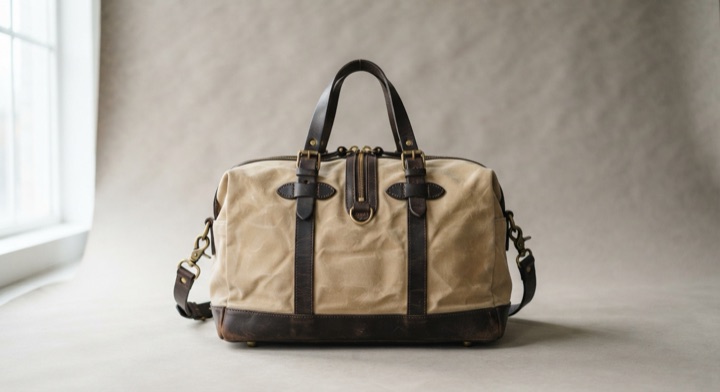
Colorway thumbnails swap the main product shot while the chosen one stays marked.
Related patterns
- Gift Card ApplyA single sheen crosses the card while the balance eases down and the amount due settles to zero.
- Upsell Slide InA complementary item opens the layout beneath the cart instead of covering it.
- Add to Cart FlyThe product tile arcs from the card into the cart glyph, and the badge ticks over on arrival.
